Prometheus + Grafana로 k8s 멀티 클러스터 모니터링 구축하기
결론부터 말하면 생각보다 삽질을 많이 했다. 방화벽이랑 CNI 문제가 겹치면서 꽤 오래 헤맸다.
🖥️ 환경
| 서버 | IP | 역할 |
|---|---|---|
| k8s 마스터 | 192.168.0.110 |
컨트롤 플레인 |
| k8s 워커 | 192.168.0.57 |
Prometheus, Grafana |
| k3s | 192.168.0.48 |
별도 경량 클러스터 |
1. 네임스페이스 생성
모니터링 관련 리소스는 monitoring 네임스페이스로 묶었다.
kubectl create namespace monitoring2. Prometheus 배포
NodePort(30090)로 노출했다.

3. Prometheus 설정
설정은 ConfigMap으로 관리한다.
scrape_configs:
  - job_name: 'prometheus'
    static_configs:
      - targets: ['localhost:9090']

  - job_name: 'node-exporter'
    kubernetes_sd_configs:
      - role: endpoints
        namespaces:
          names: ['monitoring']
    relabel_configs:
      - source_labels: [__meta_kubernetes_endpoints_name]
        action: keep
        regex: node-exporter

  - job_name: 'k3s-node'
    static_configs:
- targets: ['192.168.0.48:9100']k8s 노드는 kubernetes_sd_configs로 자동 탐색된다.
Prometheus가 k8s API에 물어봐서 노드 목록을 가져오는 구조라, 노드가 추가돼도 설정을 건드릴 필요가 없다.
그러나 k3s는 별개 클러스터라 config 에 IP 및 port (Node Exporter 의 port) 를 직접 등록했다.
kubectl get configmap prometheus-config -n monitoring -o yaml > prometheus-config.yaml
vi prometheus-config.yaml
kubectl apply -f prometheus-config.yaml
kubectl rollout restart deployment/prometheus -n monitoringrollout restart 후에는 파일을 새로 뽑아야 한다. 예전 파일로 apply하면 버전 충돌 에러가 난다.
4. node-exporter 배포
DaemonSet 으로 올리면 모든 노드에 자동으로 1개씩 배포된다. 무조건 자동이기에 추가해줄 필요가 없긴하다.
(k3s 는 별개의 클러스터이기에, 별개 클러스터는 따로 추가해줘야합니다.)
apiVersion: apps/v1
kind: DaemonSet
metadata:
  name: node-exporter
  namespace: monitoring
spec:
  selector:
    matchLabels:
      app: node-exporter
  template:
    metadata:
      labels:
        app: node-exporter
    spec:
      hostNetwork: true
      containers:
      - name: node-exporter
        image: prom/node-exporter:latest
        ports:
        - containerPort: 9100
hostPort: 9100hostNetwork: true 빼먹으면 노드 메트릭이 제대로 안 잡힌다.5️⃣ Grafana 연결
접속: http://192.168.0.57:30300 / 기본 계정: admin / admin
Data Source URL 설정할 때 주의할 점이 있다.
# 안 됨 (ClusterIP)
http://10.97.197.130:9090

# 됨 (NodePort)
http://192.168.0.57:30090k8s 내부 네트워크 이슈로 ClusterIP 통신이 안 됐다. NodePort로 우회했다.
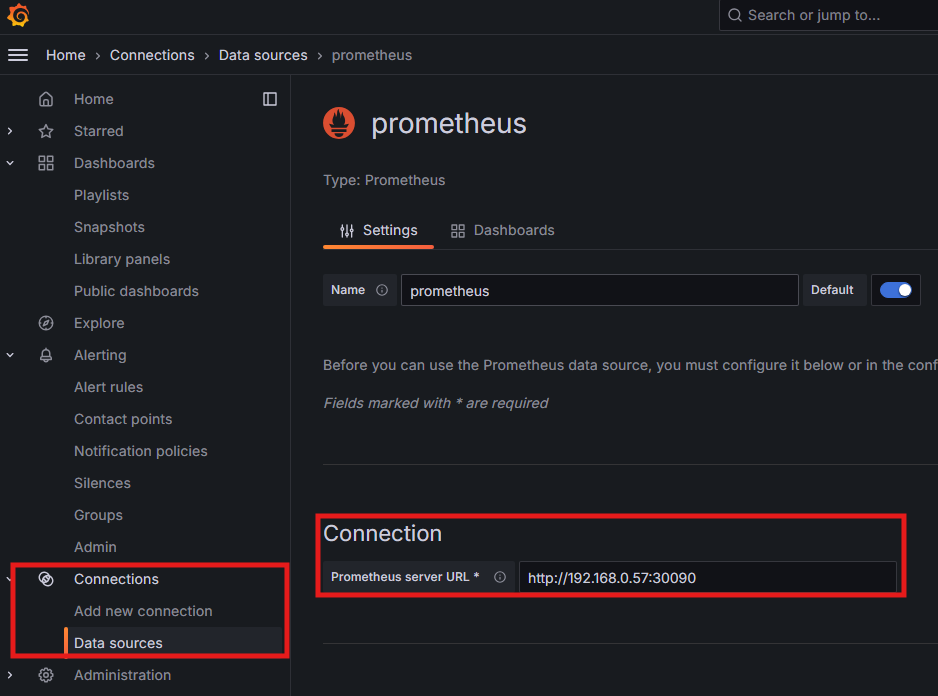
- 9090이 프로메테우스의 기본 포트인데, 외부에서 접속해야하므로 외부포트를 설정해줬다.
- 여기서는 30090포트
6️⃣ 대시보드 추가
+ → Import → ID: 1860Node Exporter Full | Grafana Labs
Nearly all default values exported by Prometheus node exporter graphed. Only requires the default job_name: node, add as many targets as you need in '/etc/prometheus/prometheus.yml'. - job_name: node static_configs: - targets: ['localhost:9100'] Recommende
grafana.com
그라파타나 랩스에서 제공하는 대시보드를 import 해서 사용할 수 있다.
1. 아래 화면에서 Dashboard Id copied 누르고
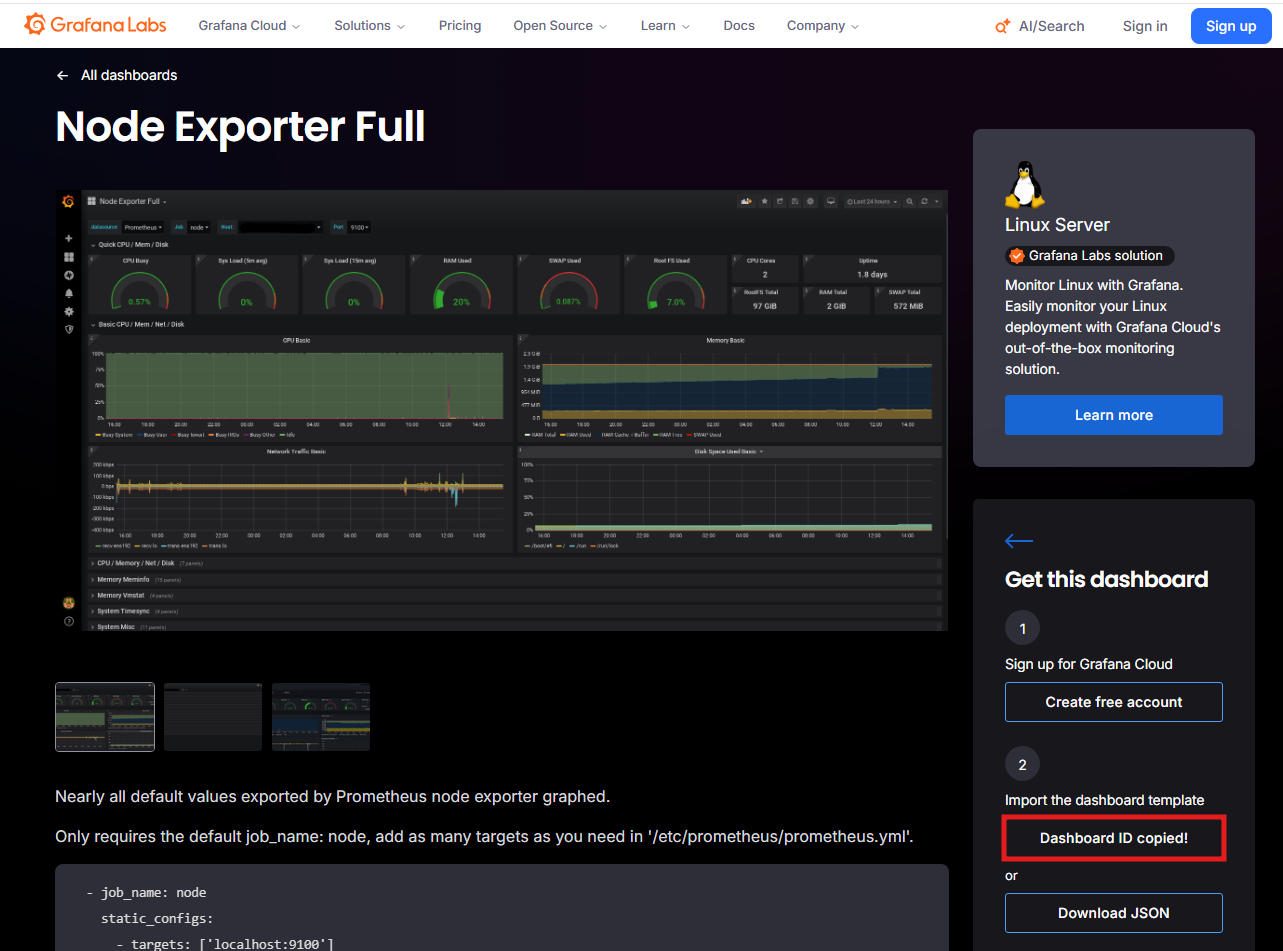
2. New > Import 누르고

3. 복사한 ID 를 붙여넣고 Load 해주면 끝
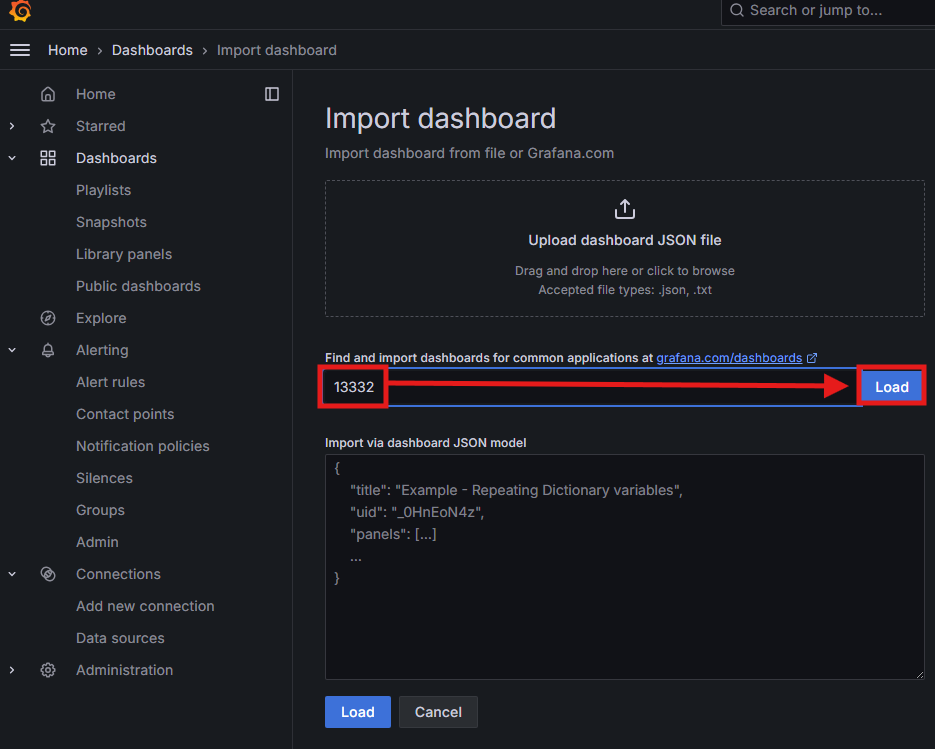

7. k3s 클러스터 추가
k3s 서버에 node-exporter를 따로 올린다.
1. k3s 서버 (192.168.0.48) 에서 실행


# monitoring 네임스페이스 생성
kubectl create namespace monitoring

# node-exporter DaemonSet 배포
cat <<EOF | kubectl apply -f -
apiVersion: apps/v1
kind: DaemonSet
metadata:
  name: node-exporter
  namespace: monitoring
spec:
  selector:
    matchLabels:
      app: node-exporter
  template:
    metadata:
      labels:
        app: node-exporter
    spec:
      hostNetwork: true
      containers:
      - name: node-exporter
        image: prom/node-exporter:latest
        ports:
        - containerPort: 9100
          hostPort: 9100
EOF

# 정상 동작 확인
curl http://localhost:9100/metrics
2. k8s 워커 (192.168.0.57) 에서 실행 — Prometheus에 k3s 등록


# ConfigMap 파일로 뽑기
kubectl get configmap prometheus-config -n monitoring -o yaml > /k8s/monitoring/prometheus-config.yaml

# 편집
vi /k8s/monitoring/prometheus-config.yaml
scrape_configs: 제일 아래에 추가:


        - job_name: 'k3s-node'
          static_configs:
            - targets: ['192.168.0.48:9100']

# 적용
kubectl apply -f /k8s/monitoring/prometheus-config.yaml

# Prometheus 재시작
kubectl rollout restart deployment/prometheus -n monitoring


3. 확인

http://192.168.0.57:30090/targets 에서 k3s-node UP 확인삽질 1. Flannel 죽어있을때
Prometheus 로그에 이 에러가 계속 나왔다.
dial tcp 10.96.0.1:443: connect: no route to hostFlannel pod가 에러 상태였다. 죽은 컨테이너가 이름을 잡고 있어서 새 컨테이너가 못 뜨는 것.
kubectl delete pod -n kube-flannel kube-flannel-ds-pjkrv --force --grace-period=0삽질 2. firewalld가 다 막고 있었다
Flannel 살렸는데도 통신이 안 됐다. firewalld가 k8s 내부 네트워크를 막고 있었다.
firewall-cmd --zone=trusted --add-source=10.96.0.0/12 --permanent
firewall-cmd --zone=trusted --add-source=10.244.0.0/16 --permanent
firewall-cmd --zone=trusted --add-interface=flannel.1 --permanent
firewall-cmd --zone=trusted --add-interface=cni0 --permanent
firewall-cmd --reload
kubectl rollout restart daemonset -n kube-system kube-proxy✅ 최종 결과
Prometheus Targets
├── prometheus (1/1)
├── node-exporter (2/2)
├── k3s-node (1/1)
├── kubernetes-apiservers
└── kubernetes-nodes (2/2)
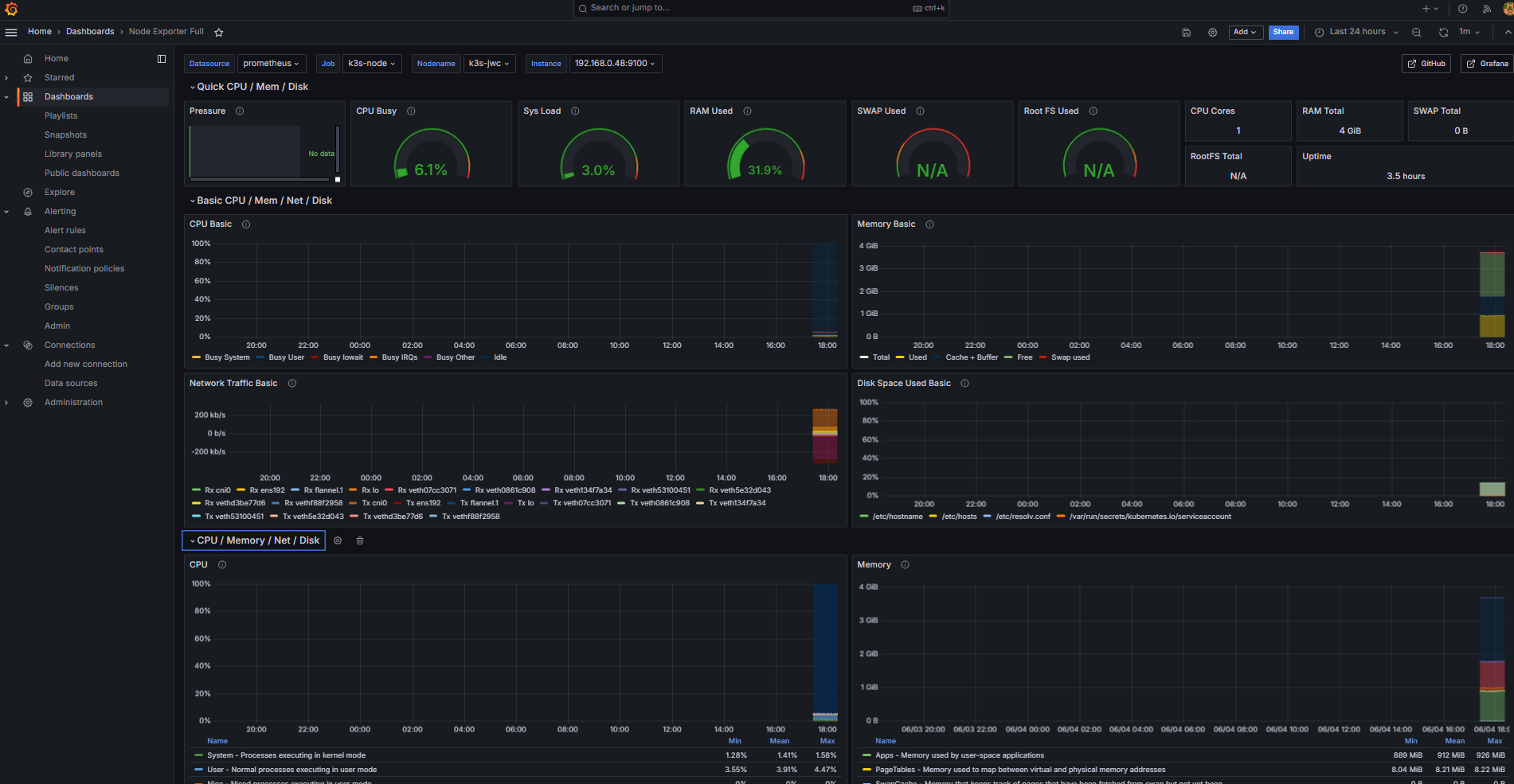

마치며
Flannel이랑 firewalld 때문에 예상보다 훨씬 오래 걸렸다.
핵심은 두 가지다.
DaemonSet — 노드가 추가되면 알아서 배포된다. 모니터링 설정을 따로 건드릴 필요가 없다.
kubernetes_sd_configs — k8s API로 타겟을 자동 탐색한다. 마스터가 클러스터 전체 정보를 갖고 있기 때문에 가능한 구조다.